WeatherMate

WeatherMate

Home  ›  Network & Internet  ›  Other
DOWNLOAD 1.24 MB
3.7  (7 votes)
2.4
This program received 10 awards
Questions & answers
Wiki
Suggest a correction

Screenshots

  • Main window
  • Settings
  • Select Locations
  • Main Window

Editorial review

Comments

Daniel Mantilla Senior editor

The following review written by one of the Software Informer contributors applies to version 3.3
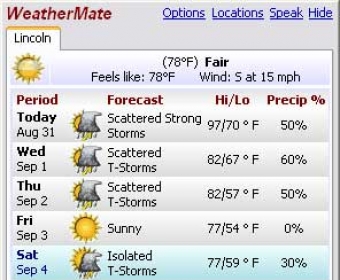
WeatherMate is a weather forecast and conditions access tool. This software will display the weather for more than 50,000 locations worldwide. WeatherMate offers you a simple and very easy to use interface with multiple customization options.
You can use the metric or the English units and switch between them in no more than two clicks.

The utility can be set to show up on top of all the running applications and there’s also an auto hide function that comes in quite handy if you want to keep your desktop neat and uncluttered. The tray icon of WeatherMate can display the actual temperature or how it actually feels like in a specific location. A very nice feature is the temperature-dependent color of the icon that helps in identifying the weather condition faster.

The main window of this application will display the exact amount of details you tell it to show. It can reveal the brief or detailed current conditions, show the present day’s forecast, day by day detail, weekly summary or weekly detail. The usual weather information (air temperature, wind speed, humidity, pressure, visibility and dew point) is accompanied by the sunrise and sunset times. If you need it, WeatherMate is able to present you with a radar map to enhance the experience. The satellite image can be animated with a single mouse click.

Accessing the Options menu from the main window or using the right-click menu and selecting the Settings section will enable you to customize the running parameters of the application. The software can update the displayed information at a time interval you select between 5 and 1440 minutes. WeatherMate can be positioned in a precise location on the computer screen and there’s also an option to prevent the main window from being dragged.

Pros

  • very easy to use.

Cons

  • none

What's new in version 3.4

Bug fixes:
-WeatherMate was unable to display current conditions due to changes at The Weather Channel. Current conditions are now displayed.
-The icon in the Current Conditions section was not displayed for some locations. The icon is now displayed for all locations.
-WeatherMate was unable to display radar images for several European locations due to changes at The Weather Channel. Radar images are now displayed.
- WeatherMate was unable to display radar images for US locations due to changes at The Weather Channel. Radar images are now displayed.
-WeatherMate was unable to display radar images for some European locations due to changes at The Weather Channel. Radar images are now displayed.

Enhancement:
-Improved data retrieval performance.
 

Publisher's description

WeatherMate is a little Windows program that gives you instant access to the weather forecast for tens of thousands of locations worldwide.
I wrote WeatherMate because I got tired of having to open several browser windows and wade through a bunch of ads to check the weather.
Features:
-Easy-to-use, attractive interface
-Highly customizable
-Displays the weather for multiple locations
-Speaks the current conditions and forecast
-Moves out of the way when not in use
-Runs in the system tray
-Automatically checks for a new version

Leave a comment


loading
Download Software Informer Client